ip
Avon User Guide
Avon is a Shakespearean task manager that keeps todos, deadlines, and events in one place. Speak commands in the text field, press Enter or Send, and Avon will answer in the conversation window.
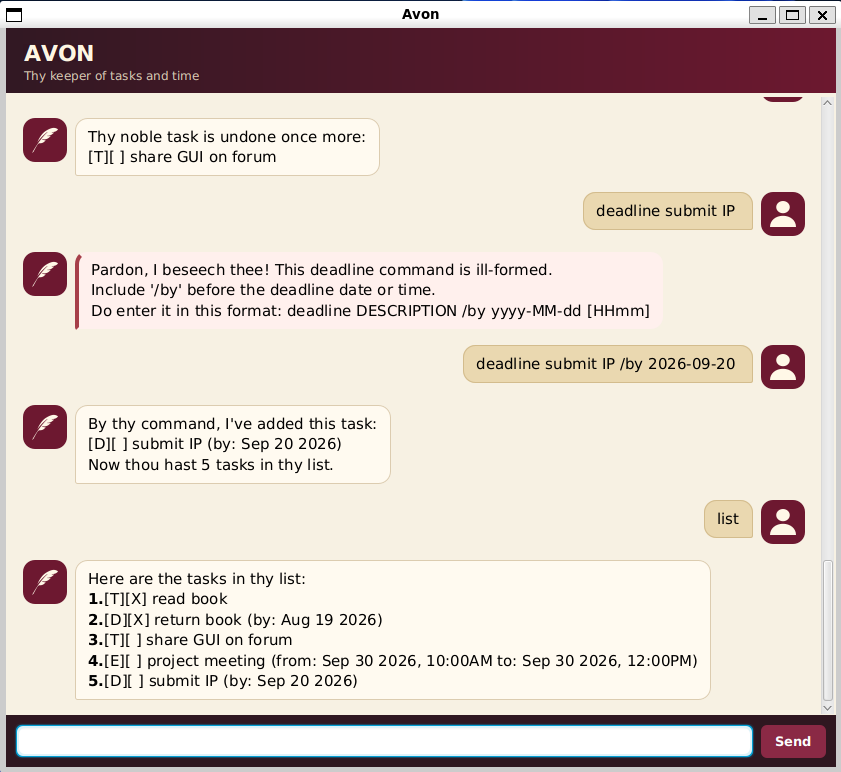
Quick start
- Install Java 25.
- Download
avon.jarfrom the latest release. - Place the JAR in an empty folder so its task data is easy to find.
- Open a terminal in that folder and run
java -jar avon.jar.
Avon creates data/avon.txt beside the JAR when the task list first changes. Keep that file if you want your
tasks to remain available the next time Avon starts.
Commands
Words in uppercase represent values that you supply. Dates and optional times use the
yyyy-MM-dd [HHmm] format, where [HHmm] is an optional 24-hour time. For example,
2026-01-02 0800 means 2 January 2026 at 8am.
Add a todo
Use todo DESCRIPTION for a task without a date.
todo read Hamlet
Add a deadline
Use deadline DESCRIPTION /by yyyy-MM-dd [HHmm] for work due by a specific date or time.
deadline submit iP /by 2026-09-18 2359
Add an event
Use event DESCRIPTION /from yyyy-MM-dd [HHmm] /to yyyy-MM-dd [HHmm] for an activity with a start and end.
The end must be later than the start.
event project meeting /from 2026-09-18 1400 /to 2026-09-18 1600
View tasks
Use list to show every task and its current number.
list
Task markers have the following meanings:
[T]— todo[D]— deadline[E]— event[ ]— not completed[X]— completed
Find tasks
Use find KEYWORD to show tasks whose descriptions contain the case-sensitive keyword.
find project
Mark or unmark a task
Use the number shown by list or find.
mark 2
unmark 2
Delete a task
Use delete TASK_NUMBER to permanently remove one task.
delete 2
Get help
Use help to see command formats inside Avon.
help
Exit Avon
Use bye to close the application.
bye
Command summary
| Action | Format |
|---|---|
| Add a todo | todo DESCRIPTION |
| Add a deadline | deadline DESCRIPTION /by yyyy-MM-dd [HHmm] |
| Add an event | event DESCRIPTION /from yyyy-MM-dd [HHmm] /to yyyy-MM-dd [HHmm] |
| View tasks | list |
| Find tasks | find KEYWORD |
| Mark a task | mark TASK_NUMBER |
| Unmark a task | unmark TASK_NUMBER |
| Delete a task | delete TASK_NUMBER |
| Get help | help |
| Exit Avon | bye |
Error recovery
Avon highlights invalid GUI responses in red and explains both the problem and the expected command format. Common corrections include:
- supply a non-empty description;
- include each required
/by,/from, or/toseparator exactly once; - use real dates and valid 24-hour times;
- choose a task number currently shown by
list; - avoid adding a task with the same type, description, and date or time as an existing task.
If data/avon.txt is missing, Avon starts with an empty task list and creates it when needed. If the file is
unreadable or corrupted, Avon reports the problem without overwriting the existing data.
Data and privacy
All task data stays in the local data/avon.txt file. Avon does not require an account or send task data over
the network.